nxt_trendz
E-Commerce Application
In this project, let’s build a Nxt Trendz - Cart Features by applying the concepts we have learned till now.
Live : https://koushiknxtrends.ccbp.tech/login
Refer to the video below:
Design Files
Click to view
- [Extra Small (Size < 576px) and Small (Size >= 576px)](https://assets.ccbp.in/frontend/content/react-js/nxt-trendz-cart-features-sm-output-v0.png) - [Medium (Size >= 768px), Large (Size >= 992px) and Extra Large (Size >= 1200px)](https://assets.ccbp.in/frontend/content/react-js/nxt-trendz-cart-features-lg-output.png)Set Up Instructions
Click to view
- Download dependencies by running `npm install` - Start up the app using `npm start`Completion Instructions
Functionality to be added
The app must have the following functionalities - When an unauthenticated user tries to access the **Cart** Route, then the page should be navigated to **Login** Route - Following are the features to be implemented - Feature 1 - When an authenticated user tries to add the same product multiple times - The quantity of the product should be updated accordingly, and the count of the cart items in the header should be remained same - Feature 2 - The total amount and number of items in the cart should be displayed in the **Cart** Route - Feature 3 - In each cart item in the cart - When the plus icon is clicked, then the quantity of the product should be incremented by one - When the minus icon is clicked, then the quantity of the product should be decremented by one - When the quantity of the product is one and the minus icon is clicked, then the respective product should be removed from the cart - Based on the quantity of the product, the product price and the Cart Summary, i.e the total cost should be updated accordingly - Feature 4 - When an authenticated user clicks on the remove button, cart item should be removed from the cart list - Feature 5 - When an authenticated user clicks on the **Remove All** button, all the cart items should be removed from the cart and [Empty Cart View](https://assets.ccbp.in/frontend/content/react-js/nxt-trendz-cart-features-empty-cart-view.png) should be displayed - The `CartContext` has an object as a value with the following properties - `cartList` - this key stores the cart items - `removeAllCartItems` - this method is used to remove all the cart items in the `cartList` - `addCartItem` - this method adds the cart item to the `cartList` - `removeCartItem` - this method removes the cart item from the `cartList` - `incrementCartItemQuantity` - this method increases the quantity of a product in the `cartList` - `decrementCartItemQuantity` - this method decreases the quantity of a product in the `cartList`
Components Structure
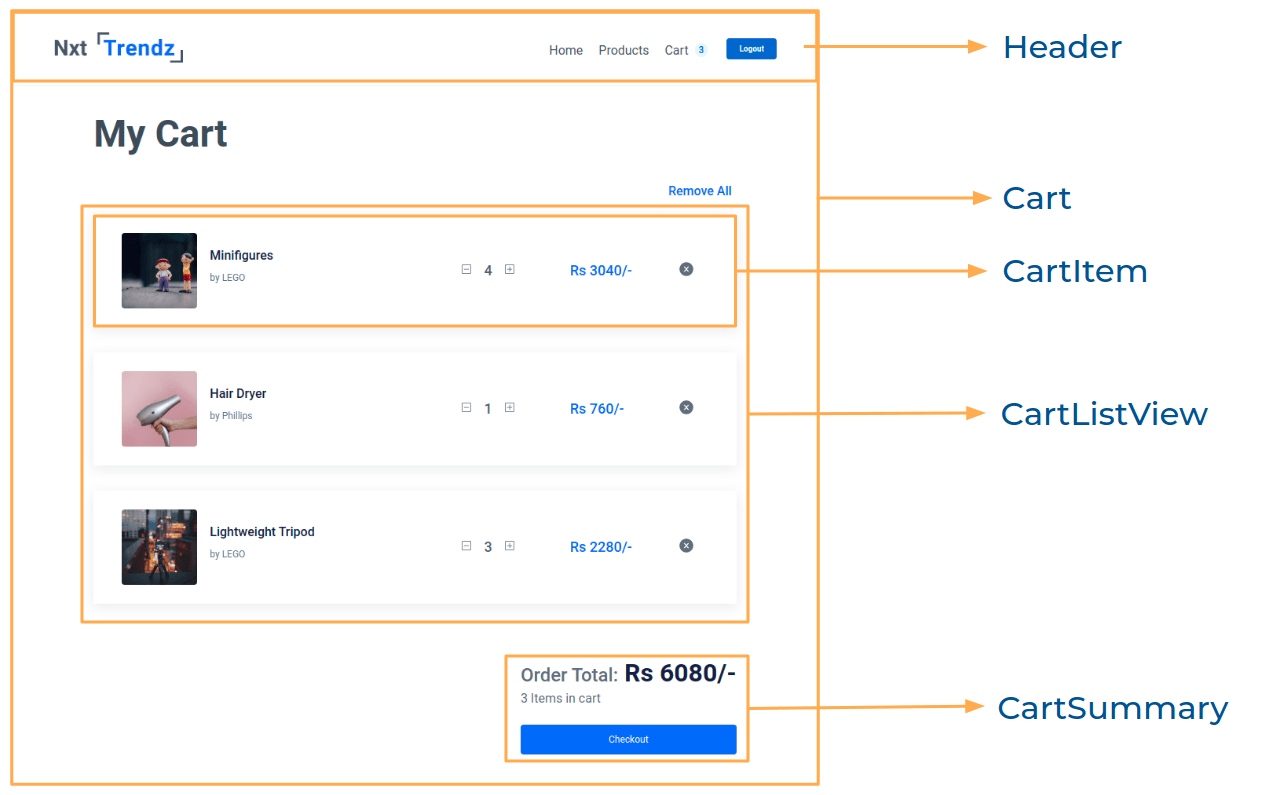
Implementation Files
Use these files to complete the implementation: - `src/App.js` - `src/components/Cart/index.js` - `src/components/Cart/index.css` - `src/components/CartItem/index.js` - `src/components/CartItem/index.css` - `src/components/CartSummary/index.js` - `src/components/CartSummary/index.css`
Quick Tips
Click to view
- The `line-height` CSS property sets the height of a line box. It's commonly used to set the distance between lines of text ``` line-height: 1.5; ```
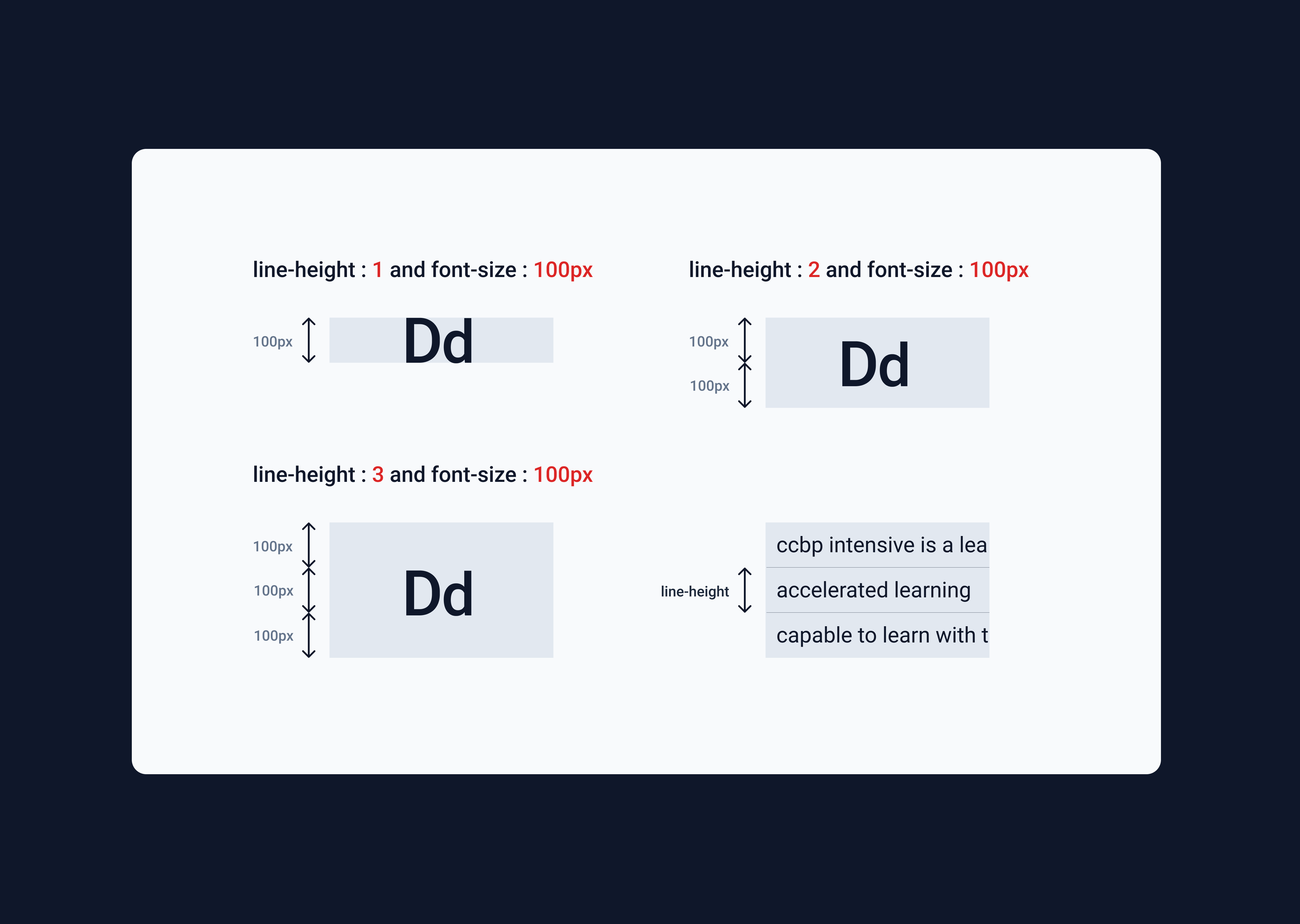 - The array method `find()` returns the first item's value that satisfies the provided testing function. If no item is found, it returns `undefined`
**Syntax**: `arr.find(Testing Function)`
- The array method `find()` returns the first item's value that satisfies the provided testing function. If no item is found, it returns `undefined`
**Syntax**: `arr.find(Testing Function)`
Important Note
Click to view
**The following instructions are required for the tests to pass** - `BsPlusSquare`, `BsDashSquare` icons from `react-icons` should be used for **plus** and **minus** buttons in cart item - The Cart Item should consist of two HTML button elements with data-testid attribute values as **plus** and **minus** respectively - `AiFillCloseCircle` icon from react-icons should be used for **remove** button in cartItem - The Cart Item should consist of an HTML button element with data-testid attribute values as **remove** - The product image in **Cart Item** Route should have the alt as `title` of the product - Prime User credentials ```text username: rahul password: rahul@2021 ``` - Non-Prime User credentials ```text username: raja password: raja@2021 ```
Resources
Colors
Hex: #0b69ff
Hex: #171f46
Hex: #616e7c
Hex: #ffffff
Font-families
- RobotoThings to Keep in Mind
- All components you implement should go in the
src/componentsdirectory.- Don’t change the component folder names as those are the files being imported into the tests.
- Do not remove the pre-filled code
- Want to quickly review some of the concepts you’ve been learning? Take a look at the Cheat Sheets.